 AnonymFiles
How it works
How AnonymFiles works, step by step
From your folder to the AI's answer with the real names: seven steps, all on your computer. Then, profession by profession, what you drop in, what is masked automatically, what you check and what you then ask the AI.
- Drop in the folder
- Detection finds what identifies people
- Compare the original and the copy
- Mask what's missing, in one click
- Approve each document, then export
- Work with the AI of your choice
- Put the real names back
Coming soon for Apple silicon Macs and Windows 10/11. No account, no telemetry, no online license check. Screenshots and examples are fictional.
The journey
Seven steps, from your folder to the AI's answer.
-
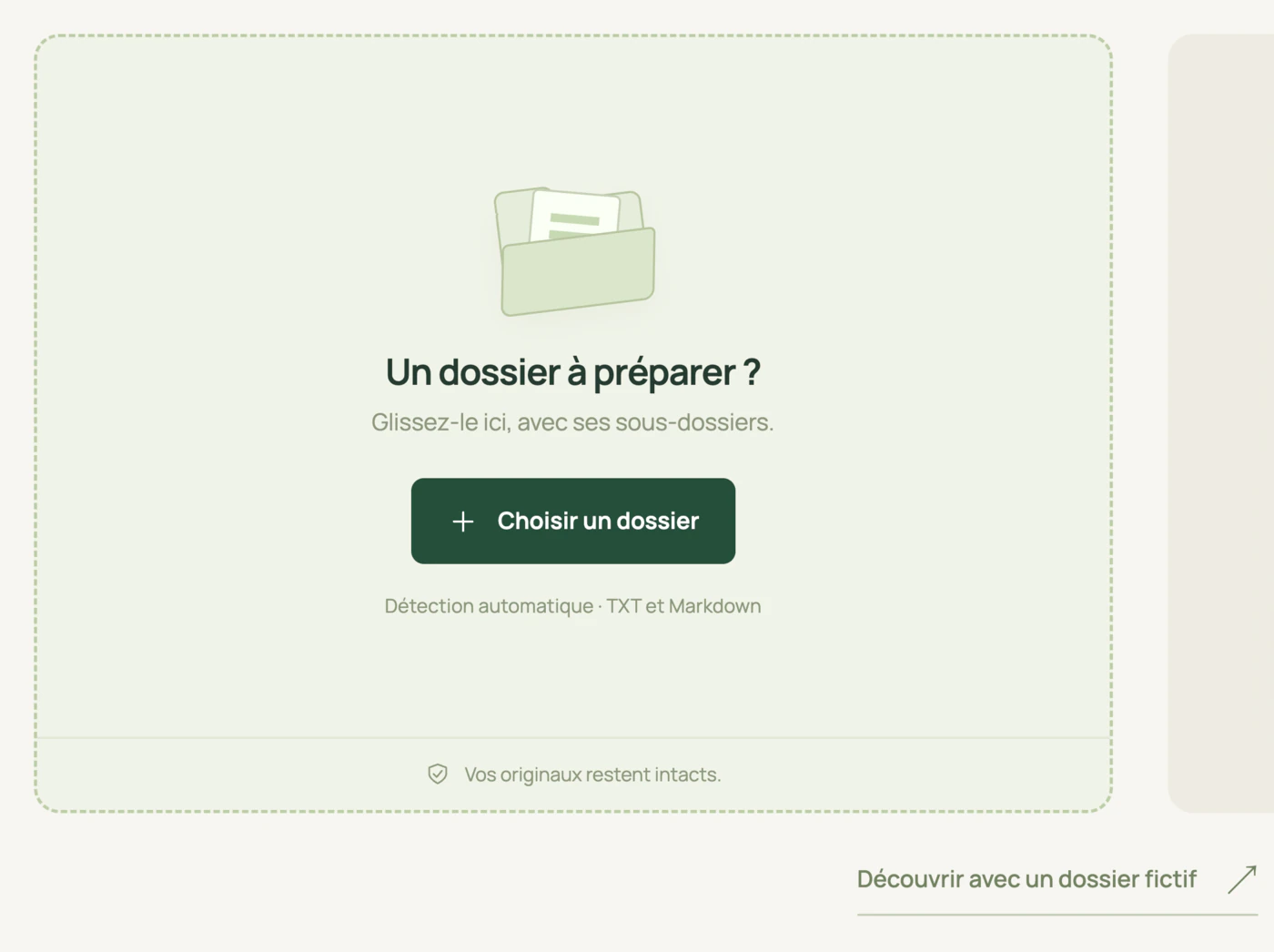
Drop in the folder
Drag a whole folder into the window, subfolders included, or choose it. To try without a real document, the app offers a built-in sample folder.
- Read: PDFs, text or scanned (local OCR), Word .docx documents (and .doc on Mac, converted locally), .eml and .msg e-mails, .xlsx, .xls and .csv spreadsheets, .pptx and .ppt presentations, .jpg, .png and .tif images, and .txt and .md files, up to 50 MB each (10 MB for text and spreadsheets).
- Flagged and excluded, never copied as is: encrypted or damaged PDFs, .doc files on Windows, archives and e-mail attachments.
- Your originals are never modified. The app works on copies, in a private workspace on your computer.
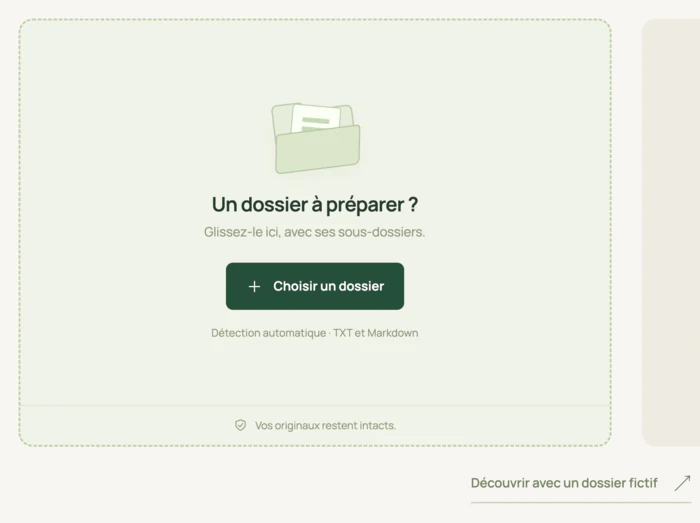
Drag the whole folder into the window, or choose it; the link at the bottom opens the built-in sample folder. -
Detection finds what identifies people
Detection starts as soon as you drop the folder, and you follow its progress document by document. Two models installed on the computer find the names of people, organizations, addresses, private dates and identification numbers; rules find e-mails, French-format phone numbers and IBANs from nine European countries.
- Each item becomes a stable label: [PERSONNE_1], [ORGANISATION_1], [ADRESSE_1]… The same person keeps the same label in every document of the folder, and several variants of a name can be linked to the same label.
- On a Mac, the models are included in the app: no connection. On Windows, they are downloaded once, on the first processing run, without any document text.
- When in doubt, nothing leaves: if the model fails to load or fails, export stays blocked, with no silent fallback to partial detection.
![Detection running in AnonymFiles: the progress bar moves document by document, and the copy already shows [PERSONNE_1], [DATE_3] and [ORGANISATION_2].](/img/how/detecter-700.webp)
Detection runs on the computer, document by document; each item found becomes a stable label. -
Compare the original and the copy
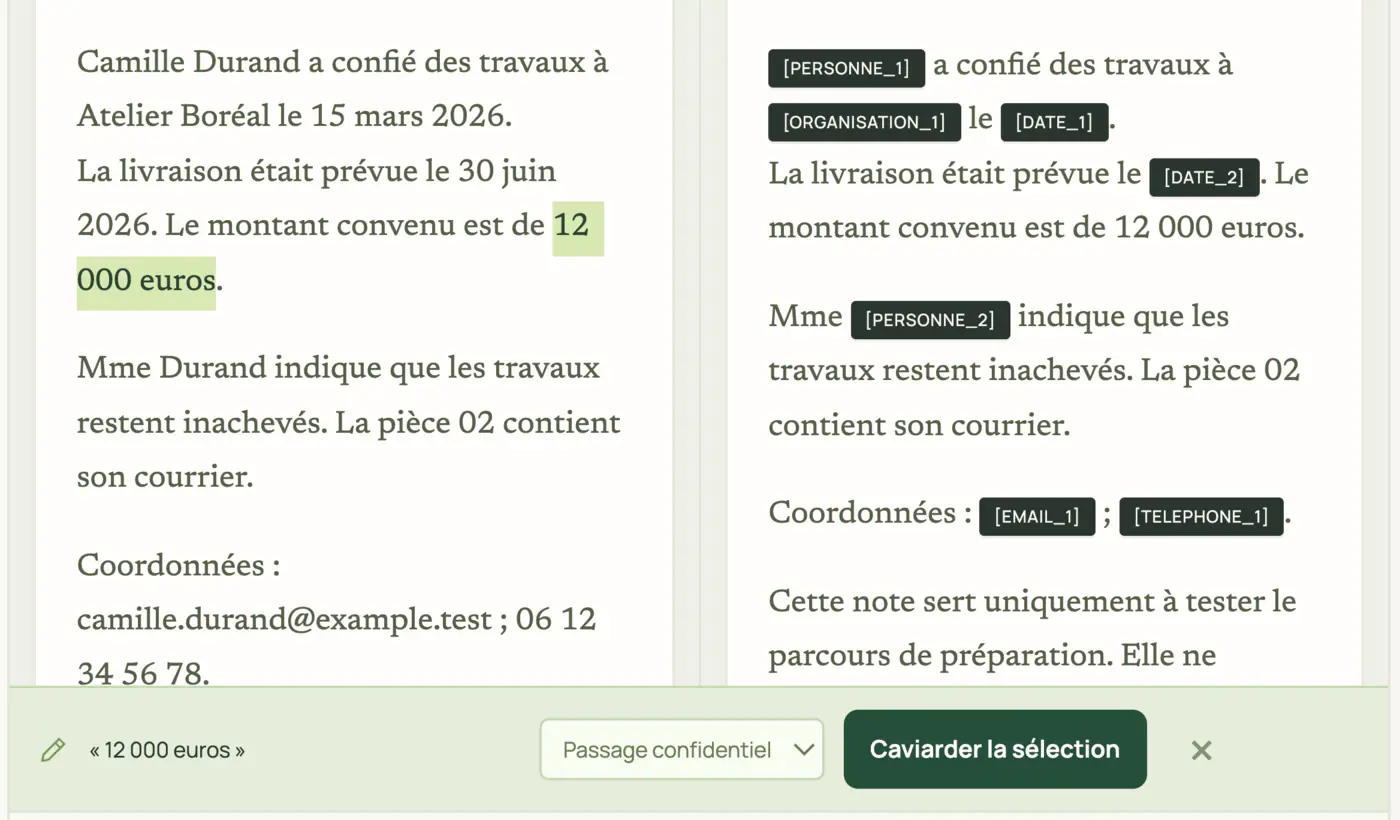
Each document is shown side by side: the original on the left, the copy on the right, exactly as the AI will receive it. A “copy only” mode lets you read it in full.
- You see precisely what was replaced, and by which label.
- A copy can still give someone away through an indirect detail: a file number, a place, a very precise date. This is the step where you spot it; the profession section further down lists the typical cases.
![Side-by-side review of a sample memo: the original on the left with the names in clear, the copy on the right with [PERSONNE_1], [ORGANISATION_1], [DATE_1], [EMAIL_1] and [TELEPHONE_1].](/img/how/comparer-700.webp)
You see what was replaced, and by which label; the 12,000 euros amount, however, is still visible in the copy. -
Mask what's missing, in one click
Select a missed passage in the original: an amount, a file number, a reference, a technical passage. It becomes a label in the copy, and the rule applies to the whole folder, not just this document.
- Amounts are not detected automatically: this is where you mask them, if the AI doesn't need to see them.
- Meaningful labels: click a label to rename it, for instance [PERSONNE_CLIENTE]. The name stays in square brackets, so that putting names back works.
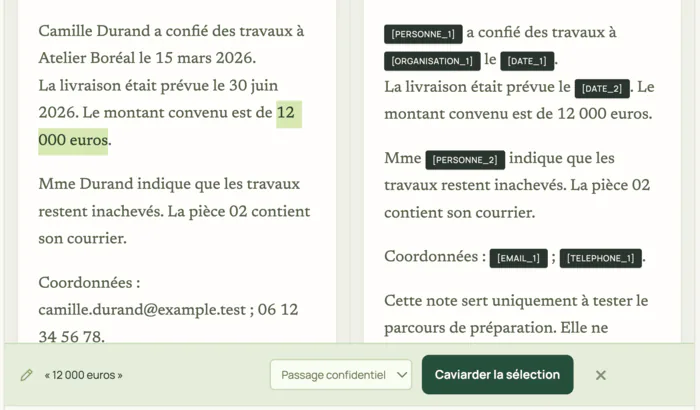
Amounts are not detected automatically: select them in the original to mask them throughout the folder. -
Approve each document, then export
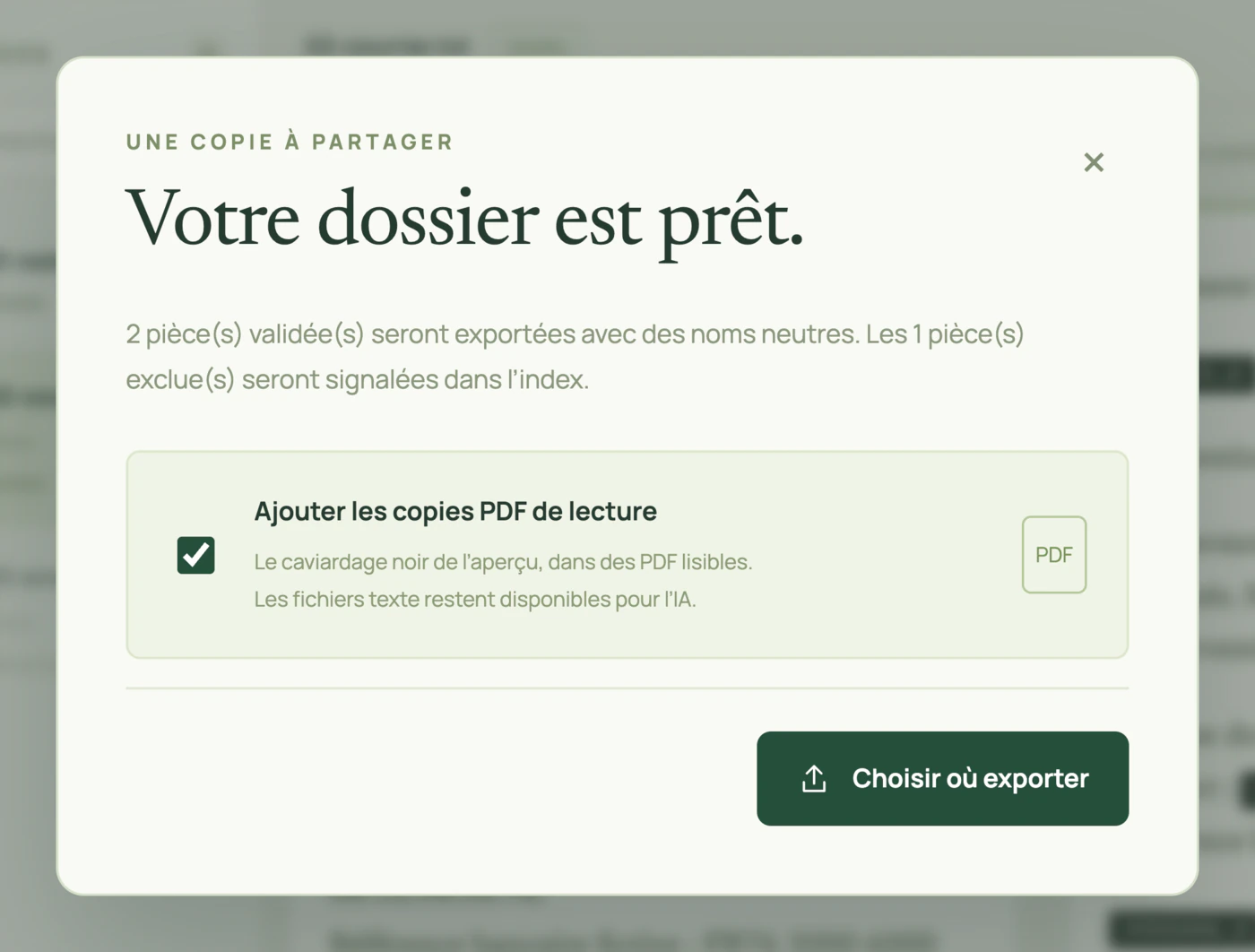
Nothing is exported without your approval, document by document. If the original, the rules or the copy change afterwards, the document must be approved again. Export then creates a new folder, wherever you choose; an existing export is never overwritten.
- Copies for the AI, with their labels. A text PDF stays a PDF, with its original layout: each masked passage becomes a black box carrying its label, and the text underneath is actually deleted (an image that overlaps a masked passage is removed). A Word file gives a .docx redacted in place, layout preserved, plus a text copy (Markdown) for the AI: body, headers, footers and notes are processed; comments, tracked changes, images and properties are removed. .txt and .md files stay text.
- Optionally, a read-only PDF copy of each Word or text file: the black redaction of the preview, with readable labels. It is generated from the already processed text: replaced values are not hidden under the boxes, they are simply no longer there. The Word layout is not reproduced.
- Neutral file names (piece-0001…), the subfolder hierarchy preserved, and an index of exported and excluded documents, without the original paths.
- Hidden layers removed: metadata, annotations, forms and links.
- No mapping table in the export. What lies behind each label stays in the private workspace, on your computer.
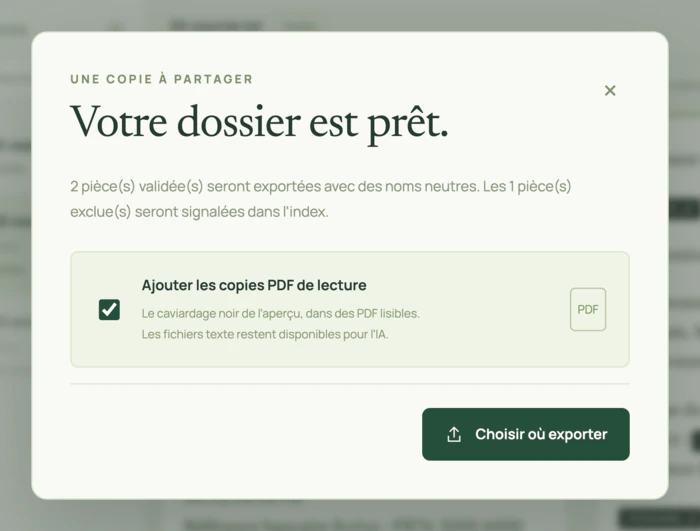
Once each document is approved, export creates a new folder with neutral file names, with optional read-only PDF copies. -
Work with the AI of your choice
After export, the “Copier la consigne IA” button copies the instructions to paste at the start of the conversation: keep the labels as they are, and repeat the folder reference, of the form [DOSSIER_…], in the answer. The exported folder also contains these instructions, in an AGENTS.md file.
- You give the copies to the AI of your choice: ChatGPT, Claude, Le Chat, Copilot… The app itself talks to no AI: you choose what to send, and where.
- Whether the instruction is followed depends on the tool: always reread the answer.
- Prefer a business plan that does not train its models on your data.
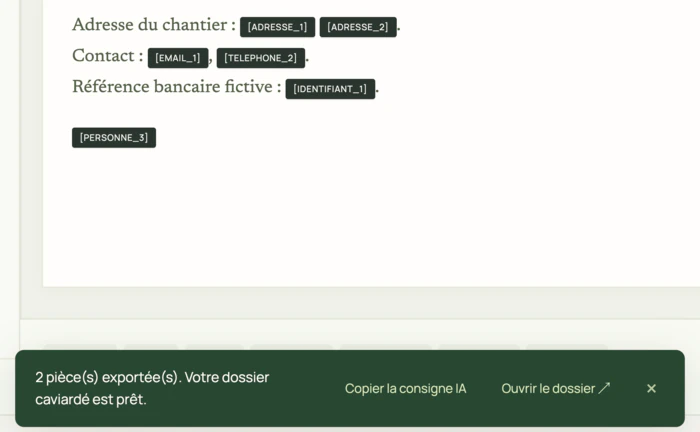
“Copier la consigne IA” copies the instructions to paste at the start of the conversation with the AI. -
Put the real names back
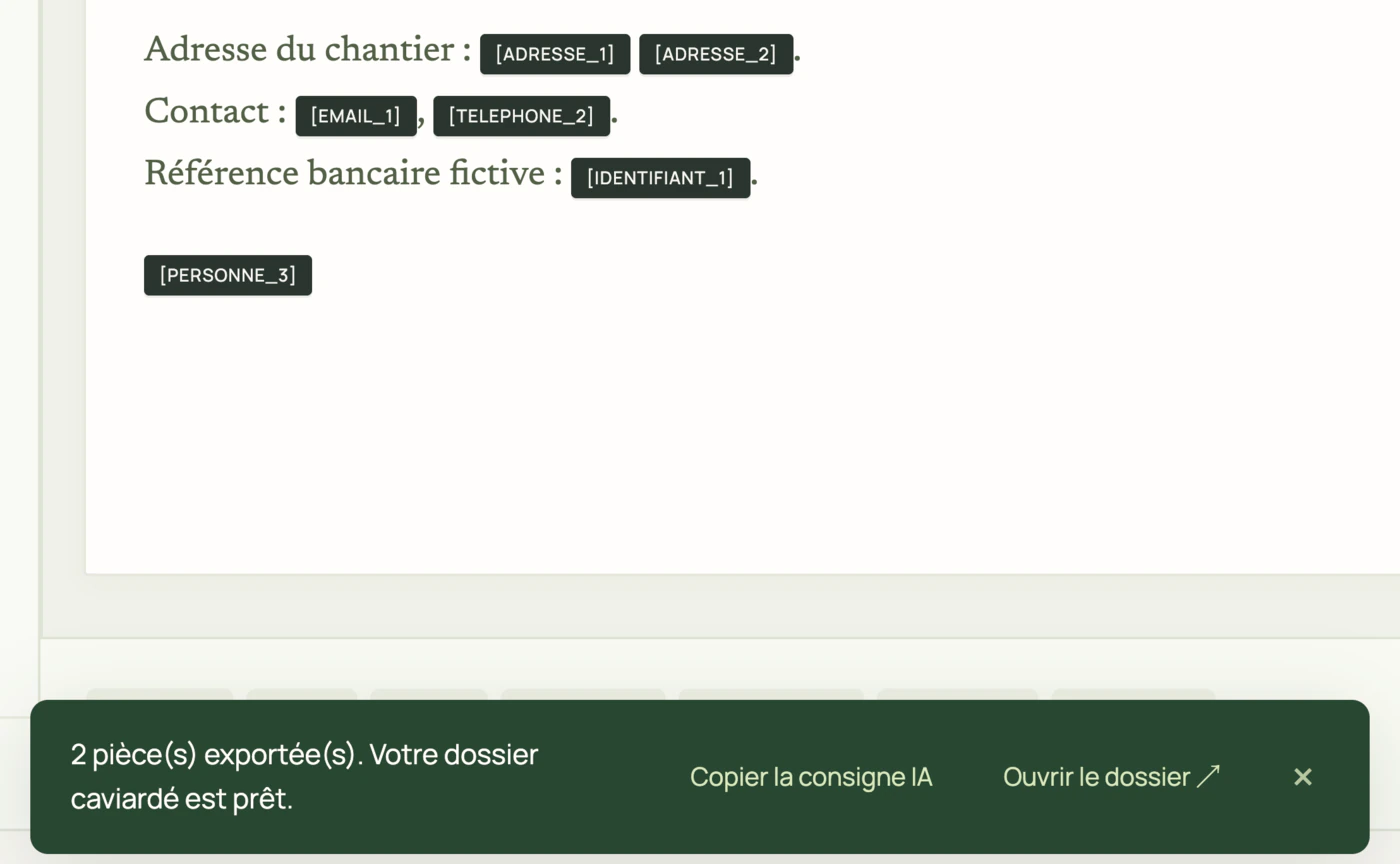
In the app, « Réinjecter un résultat » (put a result back) accepts the AI's answer pasted as is, or a .txt or .md file of up to 10 MB, or a .docx or .pdf file of up to 50 MB. The [DOSSIER_…] reference finds the right mapping, even after a restart, without reopening the original folder.
- A preview shows the text with the real names; you save it to a new text, Word or PDF file, on your computer. This replacement uses no model and no connection.
- The limits, frankly: in a restored PDF, the value is rewritten in Helvetica, not in the original font. A label comes back in a representative form of the name, and grammar is not adjusted. A missing or unknown reference, or one mixing several exports, blocks processing; unknown or modified labels are flagged, without guessing their content. Reread the preview before saving.
![Putting names back into a sample AI answer: on the left the pasted text, with its [DOSSIER_…] reference and its labels; on the right the private preview where the real names and the address are restored.](/img/how/reinjecter-700.webp)
Paste the AI's answer: the preview restores the real names on the computer, then you save it to a new file.
![Detection running in AnonymFiles: the progress bar moves document by document, and the copy already shows [PERSONNE_1], [DATE_3] and [ORGANISATION_2].](/img/how/detecter-1400.webp)
![Side-by-side review of a sample memo: the original on the left with the names in clear, the copy on the right with [PERSONNE_1], [ORGANISATION_1], [DATE_1], [EMAIL_1] and [TELEPHONE_1].](/img/how/comparer-1400.webp)
![Putting names back into a sample AI answer: on the left the pasted text, with its [DOSSIER_…] reference and its labels; on the right the private preview where the real names and the address are restored.](/img/how/reinjecter-1400.webp)
What stays with you
Where everything is, at each step.
| Your originals | Where they are, never modified. |
|---|---|
| The workspace and the mapping table (the real names behind the labels) | In the app's private folder, on your computer (on a Mac, under ~/Library/Application Support). |
| The exported copies | In the folder you choose. They only go to an AI if you send them there. |
| The answer with the real names | In a new file, on your computer. |
| At AnonymFiles | Nothing: no account, no telemetry, no online license check. |
The mapping table is encrypted by the app (AES-256-GCM); also turn on disk encryption (FileVault on a Mac, BitLocker on Windows). Security and network scope.
For your profession
The same journey, with your documents.
Detection masks people, organizations and their contact details on its own. The rest depends on your profession: here, for each one, is what you drop in, what you mask with one click and what you check.
Lawyers
Submissions, judgments, letters: professional secrecy preserved before AI.
What you drop in
- Submissions, writs, applications (Word or text PDF)
- Judgments and rulings (Text PDF)
- Opinions, memos, letters (Word, text PDF or .txt)
- Contracts and leases (Word or text PDF)
- Scanned exhibits, handwritten statements (PDF or image, read by local OCR)
Masked automatically
The parties, fellow lawyers and witnesses, the companies involved, their addresses, e-mails, phone numbers and IBANs.
To mask in one click, during review
Amounts (damages, rent, fees), and the docket number, the court or hearing dates when they identify the case.
Original · Defence submissions (fictional example)
For Ms Camille Durand, residing at 12 rue des Lilas, Lyon, against SCI Les Tilleuls.
The landlord claims 8,400 euros in unpaid rent.
Opposing counsel: Maître Paul Roux.
Copy for the AI
For [PERSONNE_1], residing at [ADRESSE_1], against [ORGANISATION_1].
The landlord claims [CONFIDENTIEL_1] in unpaid rent.
Opposing counsel: [PERSONNE_2].
Then, with the AI: summarize a file, build a chronology or draft submissions.
To check during review: a docket number, a hearing date, a property address, the name of a very local court.
Notaries
Draft deeds and sale agreements prepared with AI, without exposing your clients.
What you drop in
- Draft deeds (Word or text PDF)
- Preliminary agreements and promises to sell (Word or text PDF)
- Letters, memos, opinions (Word, text PDF or .txt)
- Estate declarations, marriage contracts (Word or text PDF)
- Scanned ID documents, title deeds and old deeds (PDF or image, read by local OCR)
Masked automatically
Sellers, buyers and heirs, companies, their addresses and contact details, IBANs.
To mask in one click, during review
The price and other amounts, land registry references, lot numbers, the matrimonial regime.
Original · Unilateral promise to sell (fictional example)
Mr Jean Martin promises to sell to Ms Sophie Leroy the property located at 8 avenue Foch, Nantes.
Agreed price: 320,000 euros.
Copy for the AI
[PERSONNE_1] promises to sell to [PERSONNE_2] the property located at [ADRESSE_1].
Agreed price: [CONFIDENTIEL_1].
Then, with the AI: review a draft deed, prepare a letter or a memo.
To check during review: a land registry reference, a lot number, a date of birth, the name of a small town.
Chartered accountants
Summary notes, articles of association, minutes: AI without your clients' names.
What you drop in
- Summary notes and reports (Word or text PDF)
- Replies to a tax reassessment notice (Word or text PDF)
- Articles of association, general meeting minutes (Word or text PDF)
- Employment contracts, engagement letters, letters (Word, text PDF or .txt)
- Balance sheets and tax returns (Text PDF)
- Excel tables, trial balances, FEC (.xlsx, .xls or .csv, one table per sheet)
- Scanned receipts and invoices (PDF or image, read by local OCR)
Masked automatically
The client and its managers, partners and employees, their addresses and contact details, IBANs and identification numbers (to check during review).
To mask in one click, during review
Amounts (turnover, profit, salaries) and any figure that makes the client recognizable.
Original · Annual summary note (fictional example)
Boulangerie Moreau SARL, managed by Mr Luc Moreau, reports a profit of 48,200 euros.
SIRET: 812 345 678 00012.
Copy for the AI
[ORGANISATION_1], managed by [PERSONNE_1], reports a profit of [CONFIDENTIEL_1].
SIRET: [IDENTIFIANT_1].
Then, with the AI: write a summary note or rework your draft reply to a tax reassessment notice.
To check during review: a SIREN number left in a header, a trade name, a registered office address, a very recognizable turnover figure.
AnonymFiles for chartered accountants · ChatGPT and chartered accountants
Commissaires de justice
Official reports and debt-collection letters: the parties stay anonymous.
What you drop in
- Official reports (text) (Word or text PDF)
- Deeds and served documents (Word or text PDF)
- Debt-collection letters (Word, text PDF or .txt)
- Decisions to enforce (Text PDF)
- Inventories and valuations (Word or text PDF)
- Report photos and scanned documents (PDF or image, read by local OCR)
Masked automatically
The applicant, the debtor, the occupant of the premises, companies, their addresses and contact details.
To mask in one click, during review
Amounts claimed or found, and details that locate the premises (apartment number, number plate).
Original · Official report (procès-verbal de constat) (fictional example)
At the request of Mr Hugo Garnier, we went to 3 impasse du Moulin, Rennes.
Occupant of the premises: Ms Inès Blanc. Arrears declared by the applicant: 2,150 euros.
Copy for the AI
At the request of [PERSONNE_1], we went to [ADRESSE_1].
Occupant of the premises: [PERSONNE_2]. Arrears declared by the applicant: [CONFIDENTIEL_1].
Then, with the AI: prepare a payment reminder, answer a debtor who disputes a statement of account or format your report notes.
To check during review: an apartment number, a number plate, a shop name, a very precise date.
AnonymFiles for commissaires de justice · AI and commissaires de justice
Insolvency practitioners
Entire insolvency proceedings, employees and creditors included.
What you drop in
- Reports to the court, applications to the supervising judge (Word or text PDF)
- Takeover bids, draft plans (Word or text PDF)
- Letters to creditors and employees (Word, text PDF or .txt)
- Opening judgments and decisions (Text PDF)
- Statements and lists of claims (Word or text PDF)
- Excel tables, claim schedules in spreadsheets (.xlsx, .xls or .csv, one table per sheet)
- Scanned proofs of claim (PDF or image, read by local OCR)
Masked automatically
The debtor company, employees, creditors, their addresses and contact details, IBANs.
To mask in one click, during review
Claim amounts, the date of the judgment and the court (published in the BODACC), the docket number, the trade name.
Original · Report on the company's situation (fictional example)
Transports Delta SAS employs 14 people, including Mr Karim Benali, operations manager.
Main creditor: Banque Epsilon, for 186,000 euros.
Copy for the AI
[ORGANISATION_1] employs 14 people, including [PERSONNE_1], operations manager.
Main creditor: [ORGANISATION_2], for [CONFIDENTIEL_1].
Then, with the AI: summarize proceedings or prepare a report to the court.
To check during review: the date of the judgment and the court, published in the BODACC, the docket number, a trade name, a site address, a unique job title.
AnonymFiles for insolvency practitioners · ChatGPT and insolvency proceedings
Patent and trademark attorneys
Patents, trademarks, designs: you choose what the AI sees.
What you drop in
- Draft patent applications (Word or text PDF)
- Oppositions, replies to patent offices (Word or text PDF)
- Trademarks: oppositions, coexistence, formal notices (Word or text PDF)
- Designs: briefs and letters (Word or text PDF)
- Licence and assignment agreements (Word or text PDF)
- Client letters, search reports (Word, text PDF or .txt)
- Drawings and official copies as image PDFs (PDF or image, read by local OCR)
Masked automatically
The applicant, inventors, owners and companies, their addresses and contact details.
To mask in one click, during review
Technical passages the AI doesn't need to see, and application or title numbers (FR, EP, WO).
Original · Draft patent application (fictional example)
Applicant: Hydrolis Technologies SAS.
Inventor: Dr Léa Fontaine.
The filter comprises, upstream, a 12-layer ceramic membrane.
Copy for the AI
Applicant: [ORGANISATION_1].
Inventor: [PERSONNE_1].
The filter comprises, upstream, [CONFIDENTIEL_1].
Then, with the AI: rephrase a letter, prepare a reply to an office action or translate a passage you chose to show.
To check during review: an earlier application number, a product name, a unique combination of features.
AnonymFiles for patent and trademark attorneys · Patents and ChatGPT
In-house counsel and DPOs
Contracts, HR files, e-mails: AI without exposing counterparties or employees.
What you drop in
- Contracts, NDAs, amendments (Word or text PDF)
- Formal notices, pre-litigation, internal memos (Word, text PDF or .txt)
- HR and disciplinary files (Word or PDF)
- Outlook e-mails (.msg or .eml, attachments not copied)
- Excel exports, registers and tracking tables (.xlsx, .xls or .csv, one table per sheet)
- Signed letters and scanned documents (PDF or image, read by local OCR)
Masked automatically
Counterparties and opponents, managers and employees, their addresses, e-mails, phone numbers and IBANs.
To mask in one click, during review
Amounts (prices, penalties, compensation), project or product names, and health or union mentions in an HR file.
Original · Memo to the executive committee (fictional example)
The contract signed with Alpha Distribution SAS provides for a penalty of 120,000 euros.
Contact: Ms Claire Petit, c.petit@alpha-distribution.fr.
Copy for the AI
The contract signed with [ORGANISATION_1] provides for a penalty of [CONFIDENTIEL_1].
Contact: [PERSONNE_1], [EMAIL_1].
Then, with the AI: review a contract, compare two versions of a clause or prepare a memo to the executive committee.
To check during review: a project or product name, a unique job title, a site address, a very recognizable contract amount.
AnonymFiles for in-house counsel and DPOs · Anonymization vs pseudonymization: the difference
What AnonymFiles doesn't do (yet)
The limits, before you start.
- A stamp, a signature or a handwritten note that a scan makes unreadable for OCR is not detected: it is masked with one click during review.
- E-mail attachments are not copied, only their number is given; drop them in as file documents.
- Amounts are not detected automatically: they are masked with one click, during review.
- The copy of a spreadsheet or a presentation is a text file, without formatting; Word and PDF keep theirs.
- In a PDF restored by putting names back, the value is rewritten in Helvetica, not in the original font.
- No automatic detection is perfect: each document is reviewed side by side, and nothing is exported without approval.
Frequently asked questions
What exactly does the AI see?
Only the copies you send it: the text with its labels, without metadata or mapping table. It sees neither your originals nor the real names.
Who can know who is behind [PERSONNE_1]?
Only you, on your computer: the mapping table stays in the app's private workspace and is never included in the export. If you delete that workspace, putting the real names back becomes impossible.
What happens if I change an original after approving it?
Approval is tied to a specific version of the document: if the original, the rules or the copy change, the document must be approved again before export. An export already made doesn't change: it's a frozen copy.
Do I need an Internet connection?
On a Mac, no, from installation onwards: the detection models are included. On Windows, once, on the first processing run, to download those models, without any document text; after that, everything works offline. Security and network scope.
Can I try it without a real document?
Yes: the app offers a built-in sample folder, to see detection, review and export without risk. AnonymFiles will soon be available for Apple silicon Macs and Windows.
How much does it cost?
€290 excl. VAT per year per seat for 1 or 2 seats, €240 excl. VAT per year per seat from 3 seats, and a custom quote beyond 20 seats. See pricing.
Anonymization or pseudonymization?
Replacing names with stable labels while keeping the mapping on your computer, so you can put the real names back into the AI's answer, is pseudonymization: the mapping table never leaves your computer. Redaction, on the other hand, removes an area for good. Anonymization vs pseudonymization: the difference.
Which AI should I use the copies with?
The one you choose: ChatGPT, Claude, Le Chat, Copilot… You attach the copy: for a PDF, text or scanned, a PDF with the same layout, where each masked passage is a labeled black box; for Word, a redacted .docx that keeps its layout, with a text file for agents. After export, the app gives you an instruction to paste into the conversation so the AI keeps the labels intact; you then put the real names back into its answer, on your computer. Prefer a business plan that does not train its models on your data.
What about scanned documents?
They are read on your computer: local OCR recognizes the text of a scanned PDF or an image (.jpg, .png, .tif), the pixels of the detected areas are erased in the image, and an invisible text layer carries the labels. A stamp, a signature or a handwritten note that the OCR cannot read is masked with one click during review. Why a scanned PDF needs special handling.
How can I check that the app sends nothing?
On a Mac, turn off Wi-Fi right after installing: processing is identical. On Windows, the detection models are downloaded once, on the first processing run, without any document text; after that, everything works offline. An application firewall confirms it. Security and network scope.
Which computers, and do I need IT support?
An Apple silicon Mac (M1 or later) or a 64-bit Windows 10 or 11 PC. On a Mac, the app is signed and notarized by Apple, installs by drag and drop and includes the detection models. On Windows, those models are downloaded once, on the first processing run. No account, no server to install.
Coming soon
The next folder you give to an AI can keep its names at home.
No account, no telemetry. A question: contact@anonymfiles.com.